WAV Format & Loading Sounds Into Vintage Synthesizers From The 80’s
Midi Tips April 24th, 2007At several of our vintage synths web pages, it say’s that our sounds are available in WAV file format. Let me explain what’s up with that. I’ll use the Oberheim OB8 as an example.
In this case, the WAV format is different then what you might expect. You can not load these sounds into your software sampler. When you purchase the .wav format, you need a Oberheim OB in order to use the sounds. If you want OB8 sounds for your software sampler then GO HERE.
So, instead of purchasing the data cassette tape, you get the sounds in a downloadable format. Now you don’t have to wait for the cassette tape to be delivered in the mail. That’s one of the cool things about the internet. You couldn’t do that back in the 80’s!
Once you download, just connect your computer audio output to your synths cassette interface input and you can load in the sounds the same way you would from a cassette tape. The files will open in any program that plays WAV files. You can use your DAW or even iTunes to load the files.
You just need a cable to connect your computer to your synth. It’s a 1/8′ mini plug for the computer and a standard 1/4′ plug for your synth. You can get one at Amazon.
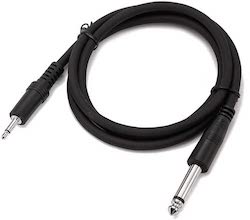
This works the same for any of the 80’s vintage synths which load sounds via the old cassette interface. This includes the Roland Juno 106, Juno 60, Jupiter-6 Jupiter-8, Korg Poly 800, DW6000 and DW8000 .
Yes, we are just about the only sound company left from those early days of midi and have lot’s of cool sounds for those old 80’s synth beasts. The decade of Miami Vice, Van Halen and Big Hair.

December 28th, 2009 at 3:52 am
I want to be clear on this: I just put the patch file on my XP machine, connected to the tape in port on the 106, and play the files in Media Player? One after another? And the 106 will handle them properly?
December 28th, 2009 at 1:07 pm
Hi Chip,
Yes, that’s basically the way it works. I think you just have to set your Juno to the bank that you want to load the sounds into. The Juno holds two banks of 64 so just switch from one to the other when loading each of our soundbanks.